IF YOUR BUSINESS CARD DESIGN CONTAINS A BLEED
IMPORTANT: If you will be using Adobe Photoshop, Adobe Illustrator/EPS format, CorelDraw or Microsoft Publisher, you MUST use the free design templates we have available for download FOR THESE SOFTWARE PROGRAMS/FORMATS in the appropriate "Download Templates" section of our Design Guidelines page. This will ensure the least hassle possible when preparing your designs for plating, which will virtually guarantee quicker turnaround and accurate, sharp print results. These templates are already set in CMYK mode, at the correct bleed design size, margins and resolution. All you need to do is open the template and start desiging. Please make sure you save the template with the same settings originally embedded, but feel free to RENAME each file to your liking. Renaming won't change any settings unless you allow that to happen.
"Bleed" is
a printing term used to indicate the area that will be trimmed off after
the job is printed and cut down to the finished size. Since the bleed
extends 1/16" all around the card, your document set-up should be
1/8" taller (1/16" on top and 1/16" on the bottom) and
1/8" wider (1/16" on the left and 1/16" on the right) than
the finished size of the card.
Since the bleed area will be trimmed off during the cutting process, there can be no text or other important information in the bleed area. Furthermore, we require an additional 1/16" safety margin. Although the background image, photo or texture used on the card must extend to the FULL BLEED SIZE (as shown in our design-size page) of your business card set-up, all your text and important information must be contained in the live area (see example below). The distance between the live area and the edge of the card is 1/8" (1/16" bleed which will be cut-off, and 1/16" safety margin). The examples below show both a correct and incorrect document set-up. If you're design does not contain the required bleeds, when in fact it should, we'll notify you to make the necessary bleed corrections, OR make the changes for you for an extra fee of $10.00 per side. You'll have the choice of paying us to do this, or correcting the bleeds yourself.
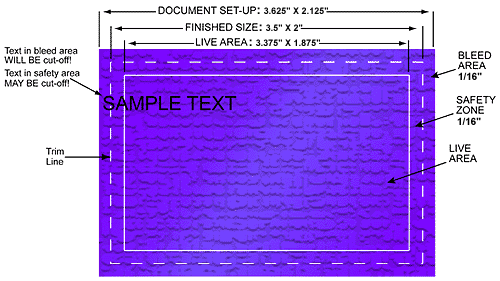 |
INCORRECT |
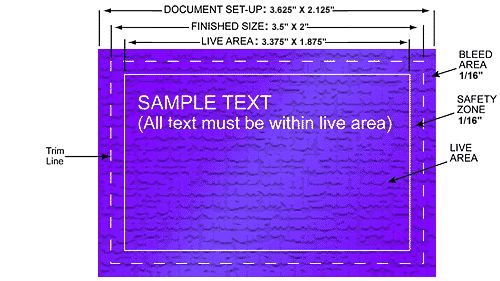 |
CORRECT |
INSIDE
TEXT MARGINS
Critical
to the design of your card is an inside text margin from the trimmed edge of the
card, shown above in the examples as the "Live Area". Typically, text
margins should be a minimum 1/16 (0.0625) inch from the trim line (or the trimmed
edge of the card). Inside text margins apply to all cards with or without bleeds,
and also apply to those important graphics which SHOULD NOT be trimmed away during
the cutting process.